

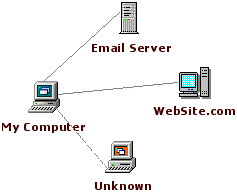
| X-NetStat displays information on your current
Internet and network connections, much like the console netstat.exe
program, but in a graphical interface. These connections are
established each time you visit a web page, send an instant message, check
your email, or do any network activity that requires you to
connect to another computer. They also made when outside
computers attempt to connect to your machine, authorized or not. X-NetStat is like radar for your computer's network & Internet activity -- you can see when connections are made in & out, what local programs are facilitating the connections, and the addresses of where they came from (or are going to). |
 |
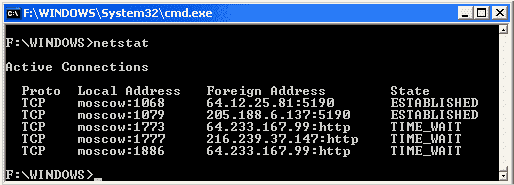
| In
the old days, to get the functionality of a "net stat" you needed to
fire up a DOS prompt window and run the command line netstat.exe: The console nature of the program made it difficult to copy information to the clipboard or continuously monitor connections, and was inaccessible to those without the knowledge of DOS. |
 |
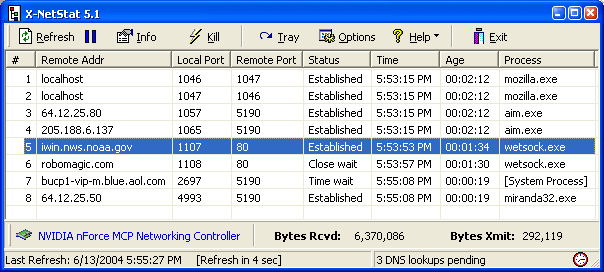
Then in 1998, Fresh Software wrote X-NetStat to bring the power of netstat to the world of Graphical User Interfaces. Each connection is displayed in the Connection Table, where you can see the address you are connected to, what ports (local and remote) are being used, the connection status, and how long the connection has been active, and the process EXE behind each connection.
 |
|
| X-NetStat 5.1 main window, AKA the Connection Table |
| X-NetStat Program Features: |
|
|
|
|
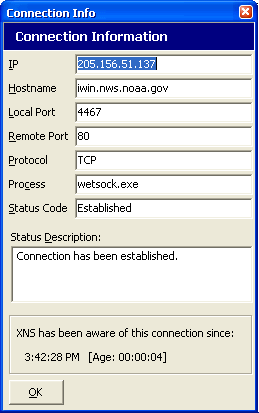
Connection Information Double-Clicking
a connection or clicking the Info button will bring up this window
where all of the available information on a connection is shown:
This dialog box makes it easy to copy information to the clipboard. * Windows XP Only
|
 |
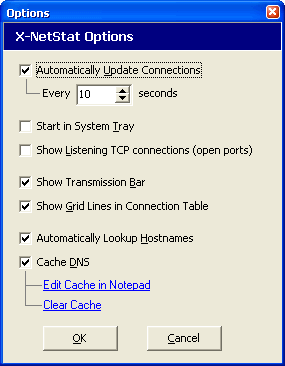 |
Program Options You can
change X-NetStat options to make the program automatically scan for new
connections, start up minimized in the system tray, show listening
connections and more.
All options are explained in the User's manual, which covers and explains the program head to toe. |
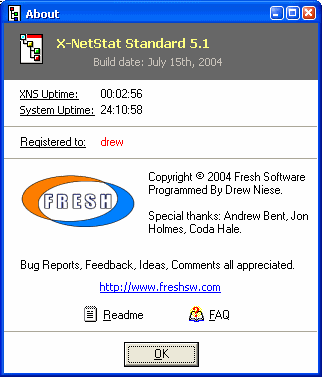
About Box Clicking
Help -> About will bring up this window, containing system
uptime, X-NetStat uptime, copyright and version information.
There are also hotlinks to Fresh Software's webpage, the FAQ and ReadMe file. |
 |
To truly get a feel for the program, you just have to try it out for yourself! Download a 15-day free trial version right now!
X-NetStat also comes in a powerful Professional Edition which has many additional features ...
X-NetStat Uses
Although X-NetStat was designed with SysAdmins in mind, the program has been used by many people for a variety of purposes.
-- prove worm to manager
-- game server autokill
-- security blanket
-- other uses
-- IP collector
-- Instrusion detection